In the ever-evolving world of search engine optimization (SEO), staying ahead of the
competition means understanding and leveraging the latest tools and techniques. One such
powerful tool is schema markup, a form of microdata that helps search engines understand the
content on a website more clearly. In this article, we’ll explore the Power of Schema Markup for Enhancing SEO.
What are the Benefits of Schema Markup?

When your pages contain Schema Markup, it allows search engines and AI-powered machines to gain a deep, semantic understanding of your website content, which offers a host of SEO-related benefits for your business. Schema Markup also enables search engines to display your content as a rich result under certain circumstances. These rich results are displayed prominently on the SERP and include extra information about a page, like ratings and reviews of local businesses.
Types of Structured Appears in Schema Markup
Structured data can enhance a website’s visibility in search engine results pages (SERPs) by enabling rich results that provide users with more detailed and visually engaging information. Since there are many types of schema markup, structured data can appear in various formats, improving click-through rates and search visibility.
Here are some of the most common ways structured data appears in SERPs:
1. Knowledge Panel Contact Information:
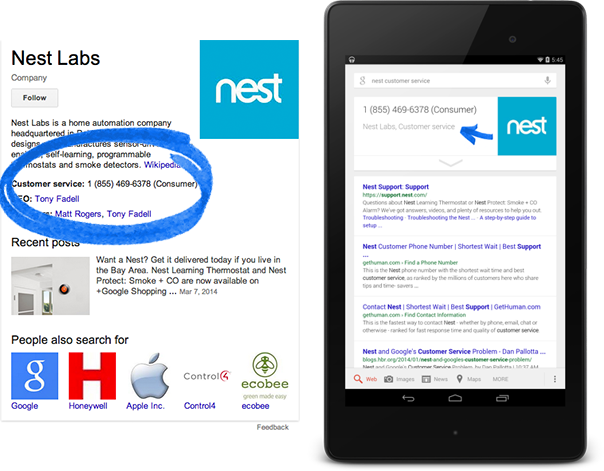
When a company implements Organization or Local Business schema, its contact details—such as phone number, address, and customer support information—can appear within Google’s Knowledge Panel on the right-hand side of desktop search results. This makes it easy for users to access essential business details directly from SERPs.
2. Social Profile Links in the Knowledge Graph:
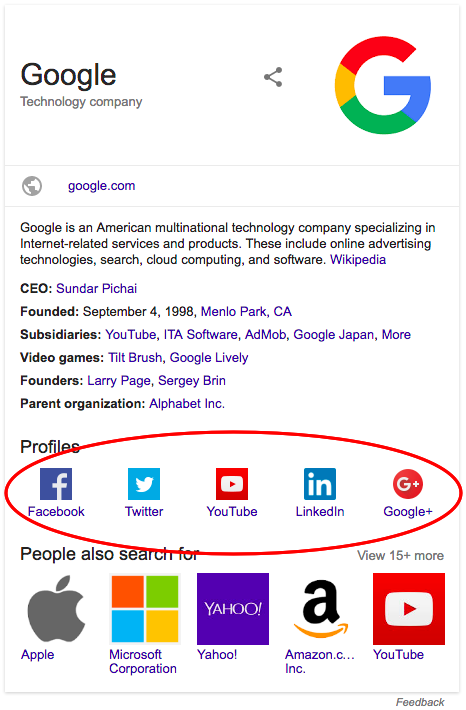
By using same as schema properties, a business can inform Google about its official social media profiles. As a result, links to these platforms (such as Facebook, X, LinkedIn, and Instagram) may be displayed within the Knowledge Graph, increasing brand authority and credibility.
3. Local Business Information:

For businesses that rely on local customers, Local Business schema helps Google display key details like operating hours, customer reviews, and location in Google Maps and local search packs. This is critical for Google’s Local Pack, which highlights businesses near the searcher’s location.
4. Product and Review Information:

Using Product and Review schema, eCommerce websites can enhance their search listings with star ratings, pricing, availability, and other details. These rich results make product listings more attractive, increasing user engagement and conversions.
How to Implement Schema Markup
Adding schema markup to your website involves selecting the most relevant schemas from the extensive list provided by Schema.org and embedding them in your site’s HTML. These schemas cover a wide range of data types, from simple descriptions of articles, products and events to more complex information like recipes, reviews and people profiles.
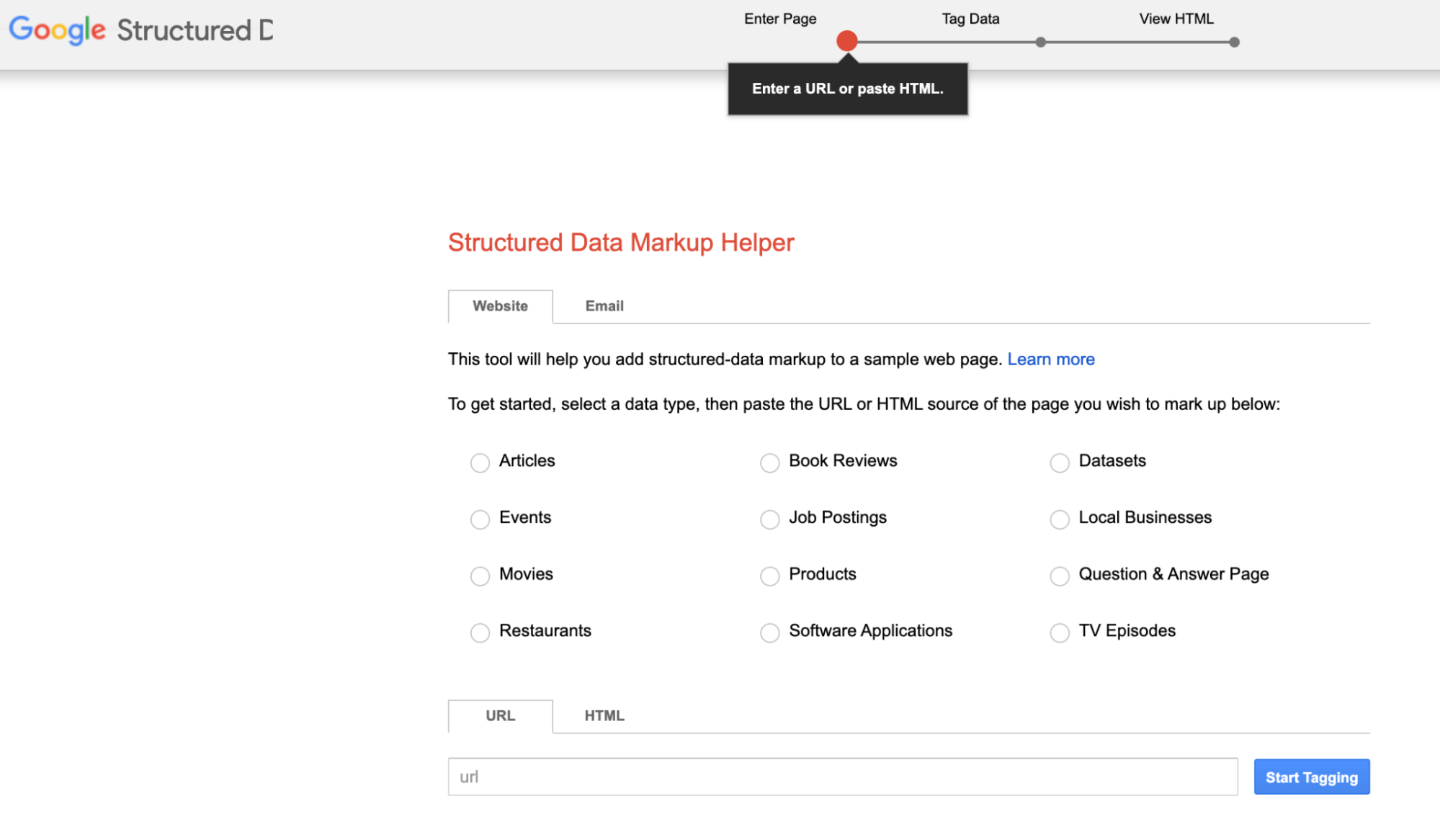
While the idea of adding structured data to your site might seem daunting at first, various tools and plugins have been developed to simplify the process. Google’s Structured Data Markup Helper, for example, is a good resource that guides users through the process of generating the appropriate HTML code for their content.
How to validate your schema markup

Before you launch a page with structured data, run it through a testing tool to ensure search engines can surface all the item properties you labeled. Here are the two most popular free validators available online.
Schema.org
The Schema.org validator performs a basic check on your code to ensure it runs. You can use it on a code snippet or live URL. To check a snippet, place your code on the left side and click the arrow near the bottom of the screen. The output appears on the right. If your code runs, the validator lists all the item properties it detected. If not, it shows you the errors it encountered.
Google’s rich results test
Google’s rich results test takes schema markup validation a step further. It can handle URLs or snippets just like Schema.org, and it checks the code to validate that it runs. Then, it also offers a preview showing how the content’s rich result might appear, and it gives recommendations for other properties to include.
5 schema markup best practices
To ensure your schema markup gets results, follow these five fundamental principles.
1. Select the appropriate schema types
Always choose the most applicable types to ensure you can access all the item properties you need. For example, using Local Business gives you access to opening Hours and price Range two options you don’t get from Organization or Place.
2. Keep your schema markup updated
If you change the content on a page, update the relevant schema markup, too. For example, if a product’s price changes, update its “price” property. If you don’t, the rich result won’t be accurate, leading to a poor user experience.
3. Stay informed about Google updates
Google occasionally updates its structured data guidelines to make new recommendations, so check back periodically. When they do, you’ll be the first to know and can optimize your content to get better rich results.
4. Validate
Google’s rich result tool provides all the testing features you need to ensure your structured data is working, comprehensive, and creates the best possible rich result. Add it to your SEO checklist so you remember to check every page before it goes out.
5. Use the JSON-LD format
JSON-LD is easier to read and update, making it the preferred schema markup format. It’s also what Google recommends, so it could play a part in search rankings in the future. Starting with the JSON-LD format primes you for that possibility and makes your markup more scalable.
Common Issues with Implementing Schema markup
Schema, just like any other code, must be implemented correctly to work. Unfortunately, it’s easy to make mistakes when adding the structured markup that can either prevent it from working or limit its abilities to boost your SEO.
Here are the most common issues with implementing schema:
- Schema information is in the structured data but not in the user-visible text. For example, star ratings are implemented to show only in the SERPs but not for a user on the page.
- Applying item properties to an entire list of items. When implemented correctly, each attribute should be applied individually to every list item.
- Applying schema to misleading content. One example of this is using the wrong item for the product name. Commonly, companies use the product name schema tag for the manufacturer’s name or the selling company.
- Review ratings showing an average rating of all items on a page. Each item should show their own unique rating.
- Applying the same markup site-wide, whereas it should appear on specific pages only.